
SECURITY BREACH? CALL 888.234.5990 EXT 9999

KKNOWLEDGE BASE

Learn From Our
IT Experts

Access expert insights and practical guidance in one place. Our knowledge base helps you stay ahead of industry trends, adopt proven best practices, and leverage resources that strengthen your organization’s performance.

BLOG ARTICLES
Netrix Global

Managing Risk with Cybersecurity Insurance

Companies are struggling to find the best way to manage risks associated with data breaches and cyber attacks. Cyber risk mitigation usually includes a robust, risk-based security program, regular assessments, and testing, but there’s no such thing as perfection. Organizations must constantly strive to thwart attackers’ efforts to penetrate their


Read More »
BLOG ARTICLES
Netrix Global

2023 Cybersecurity Trends

BLOG ARTICLE Netrix’s 2023 Cybersecurity Outlook Survey: Top 7 Takeaways With economic uncertainty on the horizon, cybersecurity threats mounting, and the ongoing popularity around distributed work, many of today’s businesses are challenged to build the right security strategy—one that will meet the needs of their current workforce while preparing the

Read More »
BLOG ARTICLES
Netrix Global

SEC’s Proposed New Rules on Cybersecurity Risk Management & Disclosure

Public companies that are subject to the reporting requirements of the Securities Exchange Act of 1934 might soon face additional new requirements. The Securities and Exchange Commission (SEC) is proposing rules to enhance and standardize disclosures regarding cybersecurity risk management, strategy, governance, and cybersecurity incident reporting. Sunlight is the Best

Read More »
BLOG ARTICLES
Netrix Global

Value Of A 24/7 Partner

The Value of a Partner Who Can Respond 24/7 If There’s a Crisis Between holiday parties, family celebrations and last-minute trips to pick up presents at the mall, the last days of the year are also some of the liveliest. For most people, it’s a time to take off from

Read More »
DOCUMENTATION
Netrix Global

UP SMS Messages

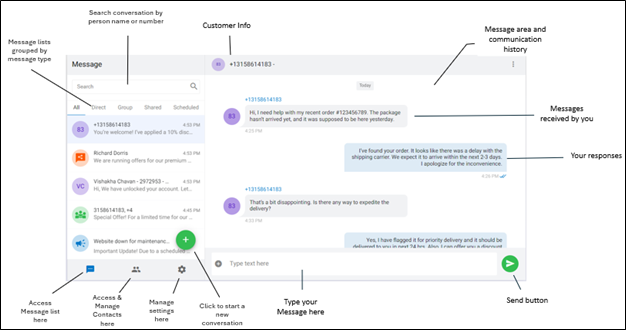
DOCUMENTATION Users can send and receive SMS messages via the User Portal by using the option  available in left menu. Interface: Start an SMS Message Step 1 Select the Messaging icon  from the navigation panels located on the left side of your User Portal menu. Step 2 Click compose icon

Read More »
DOCUMENTATION
Netrix Global

Audio Device Settings

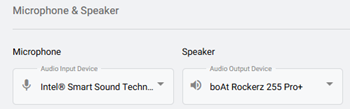
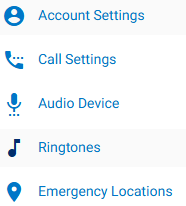
DOCUMENTATION To view Audio Device Settings, first select the Settings tab on the left navigation.   Select the Audio Device  option. Selecting Your Device Microphone: In the dropdown, choose the microphone you’d like to use from the list of detected microphones. Speaker: In the dropdown, choose the speaker you’d like to use

Read More »
DOCUMENTATION
Netrix Global

Setting a Ringtone

DOCUMENTATION To view Ringtone Settings, first select the Settings tab on the left navigation. Select, Ringtones. This is where users can manage their ringtone and ring volume.   Ringtone: In the dropdown, select the preferred ringtone.  You can press the play icon,  to hear the tone before selecting it. Ring Volume:

Read More »

Our Latest Case Studies

See firsthand how Netrix Global drives real business results for companies like yours.

Let's get problem-solving.