SECURITY BREACH? CALL 888.234.5990 EXT 9999

KKNOWLEDGE BASE

Learn From Our IT Experts

Our knowledge base is a centralized database of content created specifically to help you navigate IT issues and business challenges. Our goal is to keep you up to date with industry trends, educate you on leading best practices, and share valuable resources that you can leverage within your organization.

DOCUMENTATION
Netrix Global

Yealink T42

DOCUMENTATION A & J: Line Keys Use these keys to activate lines and assign various features B: Hookswitch Picking up the handset from the handset cradle, the hookswitch bounces and the phone connects to the line, laying the handset down on th handset cradle, the phone disconnects from the line.

Read More »
DOCUMENTATION
Netrix Global

Logging Out of the nVX User Portal

DOCUMENTATION To logout of the nVX User Portal, click on  and then click on  logout icon at the bottom left of the navigation panel. Note: When logged out of the nVX User Portal, users will no longer receive inbound calls to their nVX Websip phone. All phone calls will be

Read More »
DOCUMENTATION
Netrix Global

Change a Device Speaker or Mic

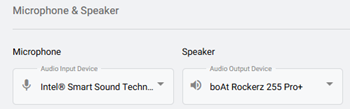
DOCUMENTATION To choose the same device for both microphone and speaker use: Step 1: Select the Additional Settings icon in the bottom left of portal to open a pop-up. Step 2: Click on the Microphone icon. Step 3: Select the devices from the options listed.  (This is pulled from windows)

Read More »
DOCUMENTATION
Netrix Global

Call Detail Records

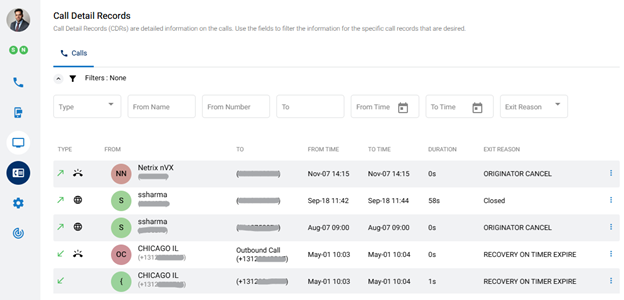
DOCUMENTATION Call Detail Records (CDRs) show information on individual calls. To view your Call Detail Records, click the Call Detail Records menu icon,   on the left panel of the dashboard. Records can be filtered and sorted. Available information in Call Details Each record contains the following details: Type – Direction of

Read More »
DOCUMENTATION
Netrix Global

Emergency Services

DOCUMENTATION Emergency services are supported both through the User Portal and when dialing 911 using an IP phone SHARE THIS

Read More »
DOCUMENTATION
Netrix Global

Selecting Your Endpoint

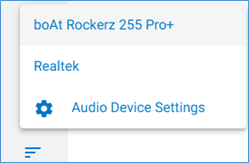
DOCUMENTATION An Endpoint is a device that is used as a communication channel for a user to make calls, receive calls, and use telephony features. Selecting an Endpoint Step 1: Select the Additional Settings icon in the bottom left of portal to open a pop-up. Step 2: The middle option is the

Read More »
DOCUMENTATION
Netrix Global

Place a Call Using Your nVX User Portal

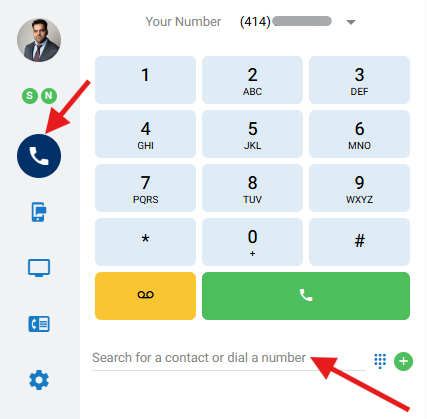
DOCUMENTATION This article will cover how to place a call via the contact directory or dial pad in the nVX User Portal. Step 1 Navigate to the Calls icon on the left Step 2 Place a call by using one of the following options Enter a phone number (numerical or

Read More »
DOCUMENTATION
Netrix Global

Logging In to nVX User Portal

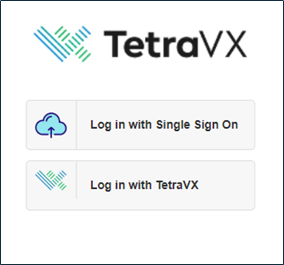
DOCUMENTATION System Requirements The nVX User Portal should be accessed via Google Chrome™ (TetraVX supports the most recent stable version; note that Google Chrome applies updates automatically). User Login Step 1: Open a Google Chrome browser window. Step 2: Enter your organization’s unique URL for the domain you are accessing.

Read More »
DOCUMENTATION
Netrix Global

User Portal Overview

DOCUMENTATION Upon logging into the nVX User Portal, users will default to the Home tab. The nVX User Portal is a web-based tool that allows users to: Login Place Calls SMS Message Messaging Meetings View Call Detail Records Access Voicemail Update User Settings Account Settings Call Routing Audio Device Settings Ringtones

Read More »

Our Latest Case Studies

See firsthand how Netrix Global drives real business results for companies like yours.
Strengthening Security Compliance and Operations for a Leading Utility Provider in LATAM

Strengthening Security Compliance and Operations for a Leading Utility Provider in LATAM

Read More
Intelligent Automation and Secure Legal Claims Processing: Transforming Occupational Risk Insurance in Argentina

Intelligent Automation and Secure Legal Claims Processing: Transforming Occupational Risk Insurance in Argentina

Read More
Board Room Transformation for a Leading Illinois Client

Board Room Transformation for a Leading Illinois Client

Read More
1.5M Calls, Zero Issues – Scaling the nVX Platform for Auto Parts Retailer

1.5M Calls, Zero Issues – Scaling the nVX Platform for Auto Parts Retailer

Read More
Collaboration That Delivers: How Netrix Transforms Cybersecurity for Pennsylvania Lumbermens Mutual

Collaboration That Delivers: How Netrix Transforms Cybersecurity for Pennsylvania Lumbermens Mutual

Read More
Powering Medical Sales with Generative AI and Natural Language Analytics

Powering Medical Sales with Generative AI and Natural Language Analytics

Read More

Let's get problem-solving.