SECURITY BREACH? CALL 888.234.5990 EXT 9999

KKNOWLEDGE BASE

Learn From Our
IT Experts

Access expert insights and practical guidance in one place. Our knowledge base helps you stay ahead of industry trends, adopt proven best practices, and leverage resources that strengthen your organization’s performance.

WEBINARS
Netrix Global

Cybersecurity Roundtable: Zero-Day Attacks, Exposing Weak Security Programs

WEBINAR Meet The Presenters Adam Berger VP, Managed Services & CISO Adam Berger has over 20 years of experience in Information technology with a diverse technical background including managing cloud service provider platforms, supporting enterprise systems, leading IT security programs, and maintaining mission critical IT infrastructure. MEET WITH THIS EXPERT

Read More »
WEBINARS
Netrix Global

Cloud Cost Control: Strategies for Smarter Spending

WEBINAR Meet The Presenters Tom Lilly Field CTO, Cloud Tom has over a decade of IT consulting experience, starting in help desk before moving into specializations like collaboration, private cloud, and Azure. He excels in working to understand clients’ cloud migration goals and develops holistic plans that encompass an end-to-end

Read More »
DOCUMENTATION
Netrix Global

Logging Out of the nVX User Portal

DOCUMENTATION To logout of the nVX User Portal, click on  and then click on  logout icon at the bottom left of the navigation panel. Note: When logged out of the nVX User Portal, users will no longer receive inbound calls to their nVX Websip phone. All phone calls will be

Read More »
DOCUMENTATION
Netrix Global

Change a Device Speaker or Mic

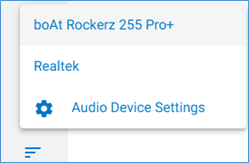
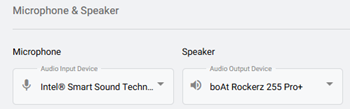
DOCUMENTATION To choose the same device for both microphone and speaker use: Step 1: Select the Additional Settings icon in the bottom left of portal to open a pop-up. Step 2: Click on the Microphone icon. Step 3: Select the devices from the options listed.  (This is pulled from windows)

Read More »
DOCUMENTATION
Netrix Global

Call Detail Records

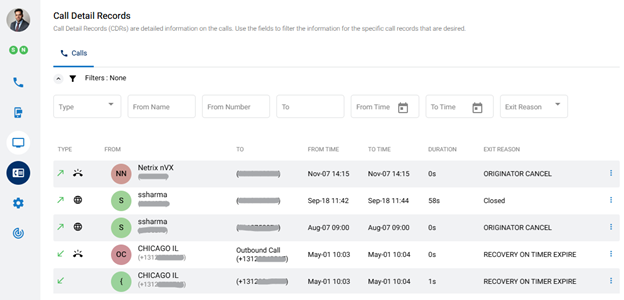
DOCUMENTATION Call Detail Records (CDRs) show information on individual calls. To view your Call Detail Records, click the Call Detail Records menu icon,   on the left panel of the dashboard. Records can be filtered and sorted. Available information in Call Details Each record contains the following details: Type – Direction of

Read More »
DOCUMENTATION
Netrix Global

Emergency Services

DOCUMENTATION Emergency services are supported both through the User Portal and when dialing 911 using an IP phone SHARE THIS

Read More »
DOCUMENTATION
Netrix Global

Selecting Your Endpoint

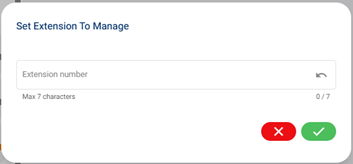
DOCUMENTATION An Endpoint is a device that is used as a communication channel for a user to make calls, receive calls, and use telephony features. Selecting an Endpoint Step 1: Select the Additional Settings icon in the bottom left of portal to open a pop-up. Step 2: The middle option is the

Read More »
DOCUMENTATION
Netrix Global

Place a Call Using Your nVX User Portal

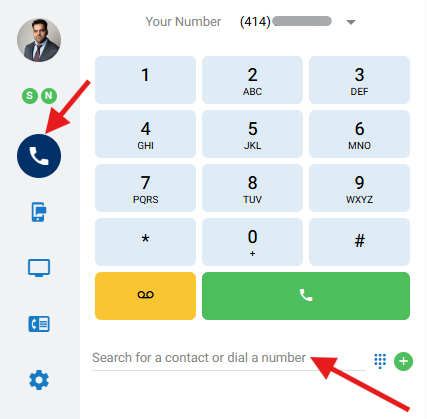
DOCUMENTATION This article will cover how to place a call via the contact directory or dial pad in the nVX User Portal. Step 1 Navigate to the Calls icon on the left Step 2 Place a call by using one of the following options Enter a phone number (numerical or

Read More »
DOCUMENTATION
Netrix Global

Logging In to nVX User Portal

DOCUMENTATION System Requirements The nVX User Portal should be accessed via Google Chrome™ (TetraVX supports the most recent stable version; note that Google Chrome applies updates automatically). User Login Step 1: Open a Google Chrome browser window. Step 2: Enter your organization’s unique URL for the domain you are accessing.

Read More »

Our Latest Case Studies

See firsthand how Netrix Global drives real business results for companies like yours.
Nebraskaland

Nebraskaland

Read More
First Option Inc.

First Option Inc.

Read More
Strengthening Security Compliance and Operations for a Leading Utility Provider in LATAM

Strengthening Security Compliance and Operations for a Leading Utility Provider in LATAM

Read More
Intelligent Automation and Secure Legal Claims Processing: Transforming Occupational Risk Insurance in Argentina

Intelligent Automation and Secure Legal Claims Processing: Transforming Occupational Risk Insurance in Argentina

Read More
Board Room Transformation for a Leading Illinois Client

Board Room Transformation for a Leading Illinois Client

Read More
1.5M Calls, Zero Issues – Scaling the nVX Platform for Auto Parts Retailer

1.5M Calls, Zero Issues – Scaling the nVX Platform for Auto Parts Retailer

Read More

Let's get problem-solving.