
SECURITY BREACH? CALL 888.234.5990 EXT 9999

KKNOWLEDGE BASE

Learn From Our
IT Experts

Access expert insights and practical guidance in one place. Our knowledge base helps you stay ahead of industry trends, adopt proven best practices, and leverage resources that strengthen your organization’s performance.

DOCUMENTATION
Netrix Global

Audio Device Settings

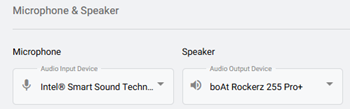
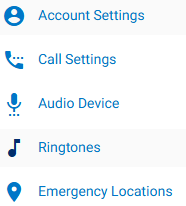
DOCUMENTATION To view Audio Device Settings, first select the Settings tab on the left navigation.   Select the Audio Device  option. Selecting Your Device Microphone: In the dropdown, choose the microphone you’d like to use from the list of detected microphones. Speaker: In the dropdown, choose the speaker you’d like to use
Read More »
DOCUMENTATION
Netrix Global

Setting a Ringtone

DOCUMENTATION To view Ringtone Settings, first select the Settings tab on the left navigation. Select, Ringtones. This is where users can manage their ringtone and ring volume.   Ringtone: In the dropdown, select the preferred ringtone.  You can press the play icon,  to hear the tone before selecting it. Ring Volume:

Read More »

Our Latest Case Studies

See firsthand how Netrix Global drives real business results for companies like yours.

Let's get problem-solving.