
SECURITY BREACH? CALL 888.234.5990 EXT 9999

KKNOWLEDGE BASE

Learn From Our
IT Experts

Access expert insights and practical guidance in one place. Our knowledge base helps you stay ahead of industry trends, adopt proven best practices, and leverage resources that strengthen your organization’s performance.

DOCUMENTATION
Netrix Global

Audio Device Settings

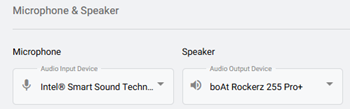
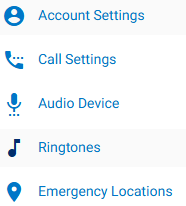
DOCUMENTATION To view Audio Device Settings, first select the Settings tab on the left navigation.   Select the Audio Device  option. Selecting Your Device Microphone: In the dropdown, choose the microphone you’d like to use from the list of detected microphones. Speaker: In the dropdown, choose the speaker you’d like to use

Read More »
DOCUMENTATION
Netrix Global

Setting a Ringtone

DOCUMENTATION To view Ringtone Settings, first select the Settings tab on the left navigation. Select, Ringtones. This is where users can manage their ringtone and ring volume.   Ringtone: In the dropdown, select the preferred ringtone.  You can press the play icon,  to hear the tone before selecting it. Ring Volume:

Read More »

Our Latest Case Studies

See firsthand how Netrix Global drives real business results for companies like yours.
Nebraskaland

Nebraskaland

Read More
First Option Inc.

First Option Inc.

Read More
Strengthening Security Compliance and Operations for a Leading Utility Provider in LATAM

Strengthening Security Compliance and Operations for a Leading Utility Provider in LATAM

Read More
Intelligent Automation and Secure Legal Claims Processing: Transforming Occupational Risk Insurance in Argentina

Intelligent Automation and Secure Legal Claims Processing: Transforming Occupational Risk Insurance in Argentina

Read More
Board Room Transformation for a Leading Illinois Client

Board Room Transformation for a Leading Illinois Client

Read More
1.5M Calls, Zero Issues – Scaling the nVX Platform for Auto Parts Retailer

1.5M Calls, Zero Issues – Scaling the nVX Platform for Auto Parts Retailer

Read More

Let's get problem-solving.